
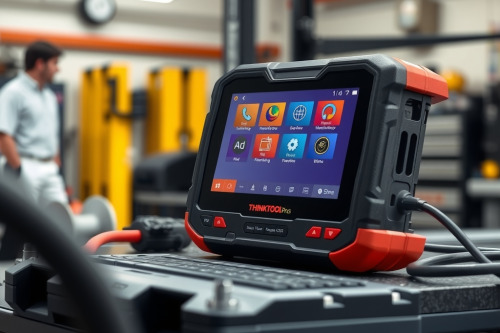
After 22 years of busting knuckles in an independent repair shop, I know that slow diagnostic tools eat up your bay time faster than a stripped bleeder screw. This hands-on THINKTOOL Pros review breaks down how this heavy-duty tablet handles tough CAN-bus problems and live fuel trim analysis without crashing. If you are tired of losing money to a diagnostic rabbit hole, this tool promises fast topology mapping and dependable bidirectional controls. We put it through brutal daily shop abuse to see if it earns a permanent spot on your rolling cart.

Why every diagnostic bay needs an honest THINKTOOL Pros review
As a flat-rate tech, every minute spent waiting for an OBD2 Scanner to clear system codes is money out of your pocket. I have used everything from ancient handheld code readers to multi-thousand-dollar dealer consoles. When the THINKTOOL Pros arrived at our shop, my crew immediately put it to work on heavy diagnostic jobs.
The first thing you notice is the thick rubber outer armor. The housing feels solid in your grease-stained hands, and the ten-inch screen stays crisp even under harsh bay lighting or direct sunlight when working on the parking lot. The hardware feels built for a working mechanic, not a desk worker.
Hardware specs, VCI dongle, and daily shop durability
Connecting the wireless VCI dongle under a cluttered dashboard is smooth. The Bluetooth connection pairs instantly without annoying drops while walking around the vehicle. The tactile buttons on the side give a satisfying click, which matters when you're wearing greasy nitrile gloves.
Battery performance holds up through an entire eight-hour shift of heavy active testing and live data logging. You don't have to leave it tethered to a wall outlet while chasing an intermittent electrical ghost. The thermal printer attachment on top lets you hand physical pre-scan reports straight to the customer before tearing into their engine.
Putting ECU coding to the test in a real THINKTOOL Pros review
Last month, a stubborn 2018 Ford F-150 rolled into my bay with an intermittent engine misfire and a stack of communication codes. The owner had already replaced ignition coils and spark plugs at another shop, but the issue kept coming back. I hooked up the THINKTOOL Pros and pulled up the full system topology map within thirty seconds.
The visual tree pinned down a dropping gateway module on the high-speed CAN-bus network immediately. I pulled freeze frame data, monitored short-term fuel trim values, and triggered active component tests to isolate the faulty harness connector. After repairing the wiring, I recoded the module smoothly, preventing a costly comeback and getting the truck out of the bay in record time.
Top diagnostic features that save bay time and prevent comebacks
Bi-directional control is where this diagnostic tablet proves its worth. You can command EVAP purge valves, cycle fuel pumps, and actuate cooling fans without leaving your seat. The live data graphing lets you overlay up to four parameters simultaneously, making oxygen sensor response times painfully obvious.
Full system topology mapping
The color-coded network structure shows healthy, fault-ridden, and non-responsive modules at a glance. You skip manually scrolling through endless diagnostic menus. It speeds up electrical triage immensely.
OEM-level module coding and calibration
Replacing a steering angle sensor or relearning a throttle body after a decarbonization service is quick. The guided functions step you through calibration routines cleanly. You don't need to send customers away to the dealership for simple component adaptations.
Honest drawbacks, software glitches, and subscription costs
No tool is perfect, and I refuse to sugarcoat the flaws. The tablet is somewhat heavy, which can cause hand fatigue during extended diagnostic sessions under the dash. Navigating deeply buried menu trees on certain European models can occasionally feel clunky.
Software updates download over Wi-Fi, but larger OEM updates can take twenty minutes to finish over a standard shop connection. The annual software subscription cost is fair compared to big-name truck brands, but you must budget for it if you want the latest vehicle coverage. Despite these minor quirks, the core scanning speed remains impressive.
Final verdict on this OBD2 Scanner for professional techs
Want to eliminate diagnostic guesswork, this scanner delivers exceptional value for independent repair shops and mobile mechanics alike. Our detailed THINKTOOL Pros review proves that this tool handles tough ECU coding, fast auto-scans, and rugged bay abuse without flinching. Inspect your current diagnostic lineup, order this unit for your rolling cart, and watch your diagnostic bay time shrink instantly.